401.04 - Spark SQL, DataFrames and Datasets
Structured vs unstructured data
Let's imagine that there's an organization, CodeAward, offering scholarships to programmers who have overcome adversity. Let's say we have two datasets:
case class Demographic(
    id: Int,
    age: Int,
    codingBootcamp: Boolean,
    country: String,
    gender: String,
    isEthnicMinority: Boolean,
    servedInMilitary: Boolean)
val demographics = sc.textfile(...) // Pair RDD, (id, demographic)

case class Finances(
    id: Int,
    hasDebt: Boolean,
    hasFinancialDependents: Boolean,
    hasStudentLoans: Boolean,
    income: Int)
val finances = sc.textfile(...) // Pair RDD, (id, finances)
Our data sets include students from many countries, with many life and financial backgrounds. Let's imagine that our goal is to tally up and select students for a specific scholarship. As an example, let's count:
- the Swiss students
- who have debt and financial dependents
This program can be implemented in many ways:
Possibility #1
Joining first.
demographics.join(finances)
    .filter{p =>    p._2._1.country == "Switzerland" &&
                p._2._2.hasFinancialDependents &&
                p,_2._2.hasDebt)
    }.count
Possibility #2
Filtering first.
val filtered = finances.filter(p => p._2.hasFinancialDependents &&
                            p._2.hasDebt)
demographics.filter(p => p._2.country == "Switzerland")
            .join(filtered)
            .count
Possibility #3
Cartesian product.
val cartesian = demographics.cartesian(finances)

cartesian.filter{
    case (p1, p2) => p1._1 == p2._1
}
.filter {
    case (p1, p2) =>    (p1._2.country == "Switzerland") &&
                    (p2._2.hasFinancialDependents) &&
                    (p2._2.hasDebt)
}
While all three possibilities lead to the same result, the time required to compute the job is vastly different. Possibility #1 runs 3.6x slower than possibility #2, while possibility #3 is 177x slower. We have to think carefully about how our Spark jobs migt be executed on the cluster in order to get good performance. It would be nice if Spark would automatically knew that it could rewrite the code in Possibility #3 to Possibility #2. Given a little bit more structural information, Spark can actually do this optimization for you.
Structurally, the data is not all equal. Data can be:
- unstructured (log files, images)
- semi-structured (JSON, XML)
- structured (database tables)
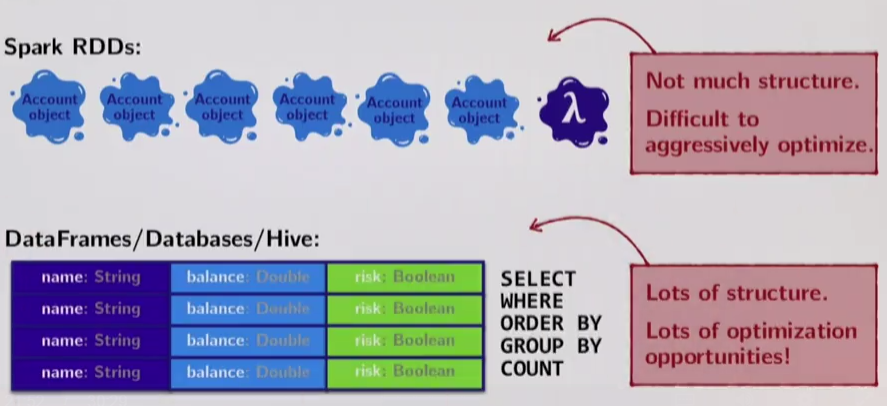
Spark and regular RDDs don't know anything about the schema of the data it's dealing with. Given an arbitrary RDD, Spark knows that the RDD is parameterized with arbitrary types (Person, Account, Demographic) but it doesn't know anything about the structure of these types.
Assuming we have a dataset of Account objects:
case class Account(name: String, balance Double, risk: Boolean)

accounts = RDD[Account]
Spark knows that the elements of the RDD must be of type Account, but it doesn't know anything about the type, because it doesn't introspect it - Accounts are just opaque blobs of data from its perspective.
In a database, data is stored in a tabular form with columns holding typed values. If Spark could see data this way, it could break up and only select datatypes it needs to send around the cluster.
The same can be said about computation. In Spark:
- we do functional transformation of the data;
- we pass user-defined function literals to higher-order functions like map, filter or flatMap. But function literals are opaque to Spark also. A user can do anything inside of these literal functions, and all Spark sees is a reference to the function literal, like $anon$1@12345.
In a database we do declarative transformations of data using specialized/structured pre-defined operations. Hence, databases can optimize these operations.
For this reason, in Spark we have to do all the optimization work ourselves.
Spark SQL
SQL is still lingua franca for doing analytics. But it's very hard to connect data processing pipelines such as Spark or Hadoop to an SQL database. It would be nice if:
- we could seamlessly intermix SQL queries with Scala;
- to get all the optimizations we are used to in relational databases on Spark jobs;
Spark SQL delivers both of the above.Spark SQL has three main goals:
1) Support relational processing both within Spark programs (on RDDs) and on external data sources with a friendly API. (Sometimes it's more desirable to express a computation in SQL syntax than with functional APIs and vice-versa);
2) High performance achieved by using techniques commonly used in relational databases;
3) Easily support new data sources such as semi-structured data and external databases;
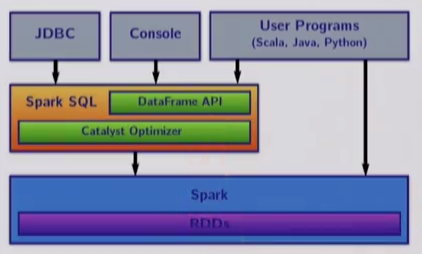
Spark SQL is a component of the Spark stack:
- it is a Spark module for structured data processing;
- it is implemented as a library on top of Spark;
It is composed of three set of APIs:
- SQL literal syntax;
- DataFrames
- Datasets
In the backend, it has two specialized components:
- Catalyst query optimizer;
- Tungsten off-heap serializer (it efficiently encodes Scala objects off-heap, away from the garbage collector);
Everything about SQL is structured:
- it has a set of fixed data types (Int, Double, String, etc)
- it has a fixed set of operations (SELECT, WHERE, GROUP BY, etc)
Research in relational databases has focused on exploiting this rigidness to get all kind of performance optimizations.
Spark SQL's core abstraction is the DataFrame (conceptually equivalent to a SQL table). DataFrames are conceptually RDDs full of records with a known schema. Unlike RDDs, DataFrames require some sort of schema information. DataFrames are also untyped - the Scala compiler doesn't check the types in its schema. DataFrames contain Rows which can contain any schema. Transformations on DataFrames are also known as untyped transformations.
A SparkSession is sort of like a SparkContext for everything related to Spark SQL.
import org.apache.spark.sql.SparkSession

val spark = SparkSession
    .builder()
    .appName("My App")
    // .config("spark.some.confog.option", "some-value")
    .getOrCreate()
DataFrames can be created in two ways:
1) From an existing RDD, with schema-inferrence or with an explicit schema; 2) Reading in a specific data source from file (common structured or semi-structured formats such as JSON);
Creating a DataFrame from an RDD, reflectively inferring the schema
Given Pair RDD:
RDD[(T1, T2, ... Tn)]a DataFrame can be created with its schema automatically inferred by simply using the toDF method.
val tupleRDD = ... // Assume RDD[(Int, String, String, String)]
val tupleDF = tupleRDD.toDF("id", "name", "city", "country") // column names
// if column names are omitted, Spark will assign numbers as attributes
If you already have an RDD holding case class instances, Spark can infer the column (attribute) names by reflection:
case class Person(id: Int, name: String, city: String)

val peopleRDD = ... // Assume RDD[Person]
val peopleDF = peopleRDD.toDF
Creating a DataFrame from an RDD explicitely specifying the schema
Sometimes it's not possible to create a DataFrame with a pre-determined case class as its schema. For these cases, it's possible to explicitely specify a schema by:
- creating an RDD of Rows from the original RDD
- creating the schema represented by a StructType matching the structure of Rows in the previous RDD
- applying the schema to the RDD of Rows via the createDataFrame() method provided by the SparkSession
Given:
case class Person(name: String, age: Int)
val peopleRdd = sc.textFile(...)    // Assume RDD[Person]

// encode the schema in a String
val schemaString = "name age"

// generate the schema based on the schema string above
val fields = schemaString.split(" ")
    .map(fieldName => StructField(fieldName, StringType, nullable = true))
val schema = StructType(fields)

// convert records of the RDD[People] to RDD[Row]
val rowRdd = peopleRdd
        .map(_.split(","))
        .map(attributes => Row(attributes(0), attributes(1).trim))

// apply the schema to the RDD
val peopleDF = spark.createDataFrame(rowRDD, schema)
Creating a DataFrame by reading in a data source from file
Using the SparkSession object, you can read in semi-structured or structured data by using the read() method. For example, to read in data and infer a schema from a JSON file:
// spark is the SparkSession object
val df = spark.read.json("examples/src/main/resources/people.json")
Semi-structured and structured data sources Spark SQL can directly create DataFrames from:
- JSON
- CSV
- Parquet
- JDBC
Once you have a DataFrame to operate on, you can freely use SQL syntax to operate on the data set.
For example, given a DataFrame called peopleDF, we just have to register our DataFrame as a temporary SQL view first:
// register the DataFrame as a SQL temporary view
peopleDF.createOrReplaceTemporaryView("people")
// this gives a name to the DataFrame in SQL
// so that we can refer to it ina SQL FROM statement

val adultsDF = spark.sql("SELECT FROM people WHERE age > 17")
The SQL statements available in Spark SQL are largely what's available in HiveQL. They include:
- SELECT
- FROM
- WHERE
- COUNT
- HAVING
- GROUP BY
- ORDER BY
- SORT BY
- DISTINCT
- JOIN
- (LEFT | RIGHT | FULL) OUTER JOIN
- Subqueries: SELECT col FROM (SELECT a+b AS col from t1) t2
Let's use another example. Let's assume we have a DataFrame representing a data set of employees:
case class Employee(id: Int, fname: String, lname: String, age: Int, city: String)

// DataFrame with schema defined in the Employee case class
val employee = sc.parllelize(...).toDF
Let's query the data to retrieve just the IDs and last names of employees working in Sydney, Australia. We want the result to be sorted in order of increasing employee ID.
val sydneyEmployeesDF = spark.sql(
    """SELECT id, lname
        FROM employees
        WHERE city = "Sydney"
        ORDER BY id""")
DataFrames
DataFrames are a relational API over Spark's RDDs. In addition to providing SQL syntax, have an API of their own. DataFrames are able to be aggressively optimized automatically.
DataFrames are untyped. The elements within the DataFrames are **Rows*** which are not parameterized with a type, like the RDDs.Therefore the Scala compiler cannot type check SQL schemas in the DataFrames.
To enable optimizations, Spark SQL DataFrames operate on a restricted set of data types:
- ByteType
- ShortType
- IntegerType
- LongType
- DecimalType
- FloatType
- DoubleType
- BinaryType
- BooleanType
- TimestampType
- DateType
- StringType
as well as a few complex data types:
- ArrayType(elementType, containsNull) - equivalent to Array[T]
- MapType(keyType, valueType, valueContainsNull) - equivalent to Map[K, V]
- StructType(List[StructFields]) - equivalent to a case class
// Scala type
case class Person(name: String, age: Int)

// Spark SQL type
StructType(List(StructField("name", StringType, true),
            StructField("age", IntegerType, true)))
It is possible to nest complex data types:
// Scala type
case class Account(
    balance: Double,
    employees: Array[Employee])

case class Employee(
    id: Int,
    name: String,
    jobTitle: String)

case class Project(
    title: String,
    team: Array[Employee],
    acct: Account)

// Spark SQL type
StructType(
    StructField("title", StringType, true),
    StructField("team",
        ArrayType(
            StructType(StructField("id", IntegerType, true),
                    StructField("name", StringType, true),
                    StructField("jobTitle", StringType, true))),
        true),
    StructField("acct",
        StructType(StructField("balance", DoubleType, true),
                StructField("employees",
                        ArrayType(
                            StructType(StructField("id", IntegerType, true),
                                    StructField("name", StringType, true),
                                    StructField("jobTitle", StringType, true))),
                        true)),
        true))
In order to access any of the data types, you must first import them:
import org.apache.spark.sql.types._The main difference between the RDD API and the DataFrames API is that the DataFrame API accepts SQL Spark expressions instead of arbtrary function literals like the RDDs. This allows the optimizer to understand what the computation represents. Example methods in the Spark SQL API:
- select
- where
- limit
- orderBy
- groupBy
- join
A useful trick when working with DataFrames is to use the show() method. This method displays the first 20 elements of the DataFrame in a table rendering. Another useful debugging method is printSchema() which prints the DataFrame schema in tree format.
Like on RDDs, transformations on DataFrames are:
- operations that return a DataFrame
- lazily evaluated
Common transformations include:
def select(col: String, cols: String*): DataFrame

def agg(expr: Column, exprs: Column*): DataFrame

def groupBy(col1: String, cols: String*): DataFrame

def join(right DataFrame): DataFrame
Other transformations include: filter, limit, orderBy, where, as, sort, union, drop.
Some APIs take Strings as parameters, holdinga column name, others are taking Columns as parameters. You can work with columns in three ways:
1) using $-notation
import spark.implicits._

df.filter($"age" > 18)
2) referring to the DataFrame
df.filter(df("age") > 18)3) Using an SQL query string
df.filter("age > 18")Example: let's implement the previous example of querying theIDs and names of employees working in Syndney, Australia (sorted by ID), but this time we will use the DataFrames API.
case class Employee(id: Int, fname: String, lname: String, age: Int, city: String)
val employeesDF = sc.parallelize(...).toDF

val sydneyEmployeesDF = employeesDF.select("id, "name")
                                .where("city == 'Sydney'")
                                .orderBy("id")
The DataFrame API makes two methods available for filtering: filter() and where(). They are equivalent.
val over30 = employeesDF.filter("age > 30")

val over30 = employeesDF.where("age > 30")
One of the most common tasks performed on DataFrames is to:
1) group data by a certain attribute 2) do some kind of aggregation on it (like a count for instance)
For grouping and aggregating, Spark SQL provides:
- a groupBy() method which returns a RelationalGroupedDataset
- which has several standard aggregation functions defined on it (like: count, sum, max, min, avg)
In order to group and aggregate:
- call groupBy on specific columns (attributes) of teh DataFrame,
- followed by a call to an aggregation function on RelationalGroupedDataset
df.groupBy($"attribute1")
    ,count($"attribute2")

df.groupBy($"attribute1")
    ,agg(sum($"attribute2"))
Example: let's say we have a dataset of homes currently on sale in an entire US state. Let's calculate the most expensive and least expensive homes for sale per zip code.
import org.apache.spark.sql.functions._

case class Listing(street: String, zip: Int, price: Int)

val listingsDF = ...  // DataFrame of Listings

val mostExpensiveDF = listingsDF.groupBy($"zip").max("price")
val leastExpensiveDF = listingsDF.groupBy($"zip").min("price")
Another more complicated example. Let's assume we have the following data set representing all of the posts in a busy open source community's Discourse forum. Let's say we want to tally up each author's posts per subforum and then rank the authors with the most posts per subforum.
import org.apache.spark.sql.functions._

case class Post(authorID, subforum: String, likes: Int, date: String)
val postsDF = ... // DataFrame of Posts

val rankedDF = postsDF.groupBy($"authorID", $"subforum")
                .agg(count($"authorID"))  // new DF with columns
                                    // authorID, subforum, count(authorID)
                .orderBy($"subforum", $"count(authorID)".desc)
Sometimes you might have a data set with null or NaN values. In these situations it's often desirable to do one of the following:
- drop the records with those unwanted values
- or replace certain values with a constant
Dropping records with unwanted values
- drop() - drops rows that contain null or NaN in any column and returns a new DataFrame
- drop("all") - drops rows that contain null or NaN in all columns and returns a new DataFrame
- drop(Array("id", "name")) - drops rows that contain null or NaN in the specified columns and returns a new DataFrame
Replacing unwanted values
- fill(0) - replaces all occurrences of null or NaN in numeric columns with the specified value and returns a new DataFrame
- fill(Map("minBalance" -> 0)) - replaces all occurrences of null and NaN in specified column with specified value and returns a new DataFrame
- replace(Array("id", Map(1234 -> 8923)) - replaces sepcified value (1234) in specified column (id) with specified replacement value (8923) and returns a new DataFrame
Like RDDs, DataFrames have their own set of actions:
- collect(): Array[Row]
- count(): Long
- first(): Row or head(): Row
- show(): Unit
- take(n: Int): Array[Row]
Joins on DataFrames
Joins on DataFrames are similar to joins in the RDDs, but because we don't have key-value pairs in this case, we have to specify the column that we are using for joining. Several types of joins are available: inner, outer, left, right_outer, leftsemi.
Given two DataFrames, df1 and df2 each with a column (attribute) called id, we can perform an inner join as follows:
df1.join(df2, $"df1.id" === $"df2.id")It's possible to change the join type by adding a third parameter to the join:
df1.join(df2, $"df1.id" === $"df2.id", "right_outer")Example: let's use the DataFrame API to implement a previous problem, the one regarding mining the CFF data set:
case class Abo(id: Int, v: (String, String))
case class Loc(id: Int, v: String)

val as = List(Abo(101, ("Ruetli", "AG")), Abo(102, ("Brelaz", "DemiTarif")),
            Abo(103, ("Gress", "DemiTarifVisa")), Abo(104, ("Schatten", "DemiTarif"))
val abosDF = sc.parallelize(as).toDF

val ls = List(Loc(101, "Bern"), Loc(101, "Thun"), Loc(102, "Lausanne"), Loc(102, "Geneve"),
        Loc(102, "Nyon"), Loc(103, "Zurich"), Loc(103, "St-Gallen"), Loc(103, "Chur"))
val locationDF = sc.parallelize(ls).toDF

// only customers that have a subscription and where there is location info
val trackedCustomersDF = abosDF.join(locationsDF, abosDF("id") === locationsDF("id"))
Let's assume that the CFF wants to know for which subscribers the CFF has managed to collect location information (it's possible that someone has an AG subscription but always pays cash, so it doesn't have any location entries, like id=104 above).
// all customers for which we have location info
val abosWithOptionalLocationDF = abosDF.join(
    locationsDF, abosDF("id") === locationsDF("id"), "left_outer")
Let's revisit the scholarship recipients example that we used at the beginning.
case class Demographic(
    id: Int,
    age: Int,
    codingBootcamp: Boolean,
    country: String,
    gender: String,
    isEthnicMinority: Boolean,
    servedInMilitary: Boolean)
val demographicsDF = sc.textfile(...).toDF  // DataFrame of Demographic)

case class Finances(
    id: Int,
    hasDebt: Boolean,
    hasFinancialDependents: Boolean,
    hasStudentLoans: Boolean,
    income: Int)
val financesDF = sc.textfile(...).toDF      // DataFrame of Finances
Our data sets include students from many countries, with many life and financial backgrounds. Let's imagine that our goal is to tally up and select students for a specific scholarship. As an example, let's count:
- the Swiss students
- who have debt and financial dependents
demographicsDF.join(financesDF, demographicsDF("ID") === financesDF("ID"), "inner")
            .filter($"hasDebt" && $"hasFinancialDependents")
            .filter($"country" === "Switzerland")
            .count
In the original example, we have seen three possible solutions for this problem, each one different in terms of performance. But in the DataFrame case, the order of applying the operations doesn't matter because the Catalyst will optimize the processing. In fact, because of the optimizations, the dataFrame solution is faster than all of our three original solutions.
Optimizations
Spark SQL optimizations are enabled by two components:
- Catalyst query optimizer
- Tungsten off-heap serializer
Catalyst compiles regular SQL statements down to RDDs. Catalyst has:
- full knowledge and understanding of all data types
- knows exactly the schema of our data
- has detailed knowledge of the computations we would like to do
so it can do a number of optimizations:
-
reordering operations - the DAG can be rearrange to something equivalent before it is actually executed. Catalyst can decide to rearrange and fuse together filter operations, pushing all filter operations as early as possible, so expensive operations later are done on less data;
-
reducing the amoount of data that must be read - skips reading in, serializing and sending around parts of the data set that aren't needed for our computations. If a Scala object has many fields that aren't necessary to our computation, Catalyst can narrow down, serialize and send around just the data that is necessary for our computation;
-
pruning unneeded partitioning - Catalyst analyzes the DataFrames and filter operations to figure out and discard partitions that are unneeded in our computations;
Tungsten is an off-heap data encoder. Since our data types are restricted to Spark SQL data types, Tungsten can provide:
-
highly specialized data encoders - Tungsten can take schema information and tightly pack serialized data into memory. This means more data can fit in memory and faster serialization/deserialization (CPU-bound operation);
-
column-based - based on the observation that most operations on tables tend to be focused on specific columns/attributes of the data set. Thus, when storing data, Tungsten groups the data by column instead of row for faster lookups of data associated with specific columns (attributes);
-
off-heap - (free from garbage-collection overhead). Tungsten uses regions of memory off the heap, that it manually manages and so it avoids garbage collection overhead and pauses;
Limitations of DataFrames
- untyped - your code compiles but you get runtime exceptions when you try to run a query on a column that doesn't exist. It would be nice if this was caught at compile time like we're used to with RDDs
listingsDF.filter($"state" === "CA")-
limited data types - if your datacan't be expressed by case classes and standard Spark SQL data types, it may be difficult to ensure that a Tungsten encoder exists for your data type (for instance, when you have an application which already uses some kind of complicated regular Scala class);
-
requires semi-structured or structured data - if the data cannot be reformulated to adhere to some kind of schema, it is better to use RDDs
Datasets
Let's say that we have just done a computation on a DataFrame representing a a data set of Listings of homes for sale. We have computed the average price of the sale per zipcode:
import org.apache.spark.sql.functions._

case class Listing(street: String, zip: Int, price: Int)
val listingsDF = ...    // DataFrame of Listings

val averagePricesDF = listingsDF.groupBy($"zip").avg("price")
If we try to collect() this result and bring it back to the master node, here is what we get:
val averagePrices = averagePricesDF.collect()
// averagePrices: Array[org.apache.spark.sql.Row]
Because the Row is untyped, we have to cast the types in the row, and in order to do this, we must remember the position and data type of each column in the row:
val averagePricesAgain = averagePrices.map {
    row => (row(0).asInstanceOf[Int], row(1).asInstanceOf[Double])
}
Wouldn't it be nice to have both Spark SQL optimizations and type safety? Enter DataSets.
DataFrames are actually Datasets!!!
type DataFrame = Dataset[Row]What are Datasets?
- Datasets can be thought of as typed distributed collections of data;
- Dataset API unifies the DataFrame and RDD APIs - mix and match!
-
Datasets require semi-structured or structured data. Schemas and Encoders are part of Datasets;
Datasets are a compromise between RDDs and DataFrames, You get more type information on Datasets than on DataFrames and you get more optimizations on Datasets than you get on RDDs.
Here's an example of mixing and matching RDD and DataFrame APIs:
 val listingsDS = ...   // Dataset[Listing]
 listingsDS.groupByKey(l => l.zip)      // like groupByKey in RDDs
        .agg(avg($"price").as[Double])  // like DataFrame operators
Datasets are something in the middle between DataFrames and RDDs,
- you can still use relation DataFrame operations;
- Datasets add more typed operations that can be used as well;
- Datasets let you use high-order functions like: map, flatMap, filter again;
Creating Datasets
- from a DataFrame
import spark.implicits._

myDF.toDS- read in data from JSON from a file - which can be done with the read() method on the SparkSession object and then convert to a Dataset:
val myDS = spark.read.json("people.json").as[Person]- from an RDD
myRDD.toDS- from common Scala types
List("one", "two", "three").toDSTyped columns
On Datasets, typed operations act on TypedColumn (instead of Column as for the DataFrames). To create a TypedColumn:
$"price".as[Double]Transformations on Datasets
The Dataset API includes both:
- untyped transformations - like for the DataFrame
- typed transformations - typed variants of many DataFrame transformations + additional RDD-like high-order functions like: map, flatMap. etc
These APIs are integrated. You can call map() on a DataFrame and get back a DataSet. Warning: not all operations from RDDs are available for Datasets and some Dataset operations might look slightly different than their RDD counterpart.
When going from a DataFrame to a Dataset via typed transformations, you might have to provide additional explicit type information:
val keyValuesDF = List((3, "Me"),(1,"Thi"),(2,"Se"),(3,"ssa"),(3,"-)"),(2,"cre"),(2,"t")).toDF
val res = keyValuesDF.map(row => row(0).asInstanceOf[Int] + 1)
Common typed transformations on Datasets
map[U](f: T => U): Dataset[U]

flatMap[U](f: T => TraversableOnce[U]): Dataset[U]

filter(pred: T => Boolean): Dataset[T]

distinct(): Dataset[T]

groupByKey[K](f: T => K): KeyValueGroupedDataset[K, T]

coalesce(numPartitions: Int): Dataset[T]

repartition(numPartitions: Int): Dataset[T]
Like on DataFrames, Datasets have a special set of aggegation operations meant to be used after a call to groupByKey() on a Dataset:
- calling groupByKey on a Dataset returns a KeyValueGroupedDataset
- KeyValueGroupedDataset contains a number of aggregation operations which return Datasets
Some KeyValueGroupedDataset aggegation operations:
reduceGroups(f: (V, V) => V): Dataset[(K, V)]

agg[U](col: TypedColumn[V, U]): Dataset[(K, U)]
Just like for DataFrames, there is a general aggregation operation agg defined on a KeyValueGroupedDataset.
agg[U](col: TypedColumn[V, U]): Dataset[(K, U)]The argument of this function is peculiar. We usually pass for this argument an aggregating function such as avg by specifying the column that has to be aggregated.
someDS.agg(avg($"somecolumn").as[Double])Other KeyValueGroupedDataset operations are not aggregation operations:
mapGroups[U](f: (K, Iterator[V]) => U): Dataset[U]

flatMapGroups[U](f: (K, Iterator[V]) => TraversableOnce[U]): Dataset[U]
reduceByKey
Datasets don't have a reduceByKey() operation. Here is a possible way to emulate it:
val keyValues = List((3, "Me"),(1,"Thi"),(2,"Se"),(3,"ssa"),(3,"-)"),(2,"cre"),(2,"t"))

val keyValuesDS = keyValues.toDS

keyValuesDS.groupByKey(p => p._1)       // this is not a Dataset, we must turn it into one
        .mapGroups((k, vs) => (k, vs.foldLeft("")((acc, p) => acc + p._2)))
Warning! mapGroups() will shuffle the entire Dataset!!! Use the reduce() function or an Aggregator instead!!!
val keyValues = List((3, "Me"),(1,"Thi"),(2,"Se"),(3,"ssa"),(3,"-)"),(2,"cre"),(2,"t"))

val keyValuesDS = keyValues.toDS

keyValuesDS.groupByKey(p => p._1)       // this is not a Dataset, we must turn it into one
        .mapValues(p => p._2)
        .reduceGroups((acc, str) => acc + str)
or you can use an Aggregator, which is a class that helps you to generically aggregate data:
class Aggregator[-IN, BUF, OUT]- IN is the input type of the aggregator. When using an aggregator after groupByKey this is the type that represents the value in the key-value pair;
- BUF is the intermediary type during aggregation;
- OUT is the type of the output of the aggregation;
val myAgg = new Aggregator[IN, BUF, OUT] {
    def zero: BUF = ...                 // initial value
    def reduce(b: BUF, a: IN): BUF = ...    // add an element to the running total
    def merge(b1: BUF, b2: BUF): BUF = ...  // merge intermediate values
    def finish(b:BUF): OUT = ...            // return the final result
}.toColumn
Here is how to emulate reduceByKey() using an Aggregator:
val keyValues = List((3, "Me"),(1,"Thi"),(2,"Se"),(3,"ssa"),(3,"-)"),(2,"cre"),(2,"t"))

val keyValuesDS = keyValues.toDS

val strConcat = new Aggregator[(Int, String), String, String] = {

    def zero: String = ""

    def reduce(b:String, a: (Int, String): String  = b + a._2

    def merge(b1: String, b2: String): String = b1 + b2

    def finish(b:String): String = b

}.toColumn

keyValuesDS.groupByKey(pair => pair._1).agg(strConcat.as[String])
The code above doesn't compile, because there are two other methods that need to be implemented: bufferEncoder() and outputEncoder(). Both of them are of type Encoder.
Encoders are what convert the data between JVM objects and Spark SQL's internal (tabular) representation. They are required by all Datasets! Encoders are highly specialized, optimized code generators that generate custom bytecode for data serialization / deserialization. The serialized data is stored using Spark's internal Tungsten binary format, allowing for operations on serialized data and improved memory utilization.
What sets Encoders apart from regular Java or Kryo serialization:
-
limited to and optimal for primitives and case classes, Spark SQL data types, which are well understood;
-
contain schema information which makes these highly optimized code generators possible and enables optimization based on the "shape" of the data. Since Spark understands the structure of data in Datasets, it can create a more optimal layout in memory when caching Datasets;
-
use significantly less memory than Kryo/JVM serialization;
-
10x faster than Kryo, orders of magnitude faster than JVM serialization;
There are two ways to introduce encoders:
-
Automatically - via implicits from a SparkSession (import sparks.implicits._)
-
Explicitely - via org.apache.spark.sql.Encoders, which contains a large selection of methods for creating Encoders from Scala primitive types and Products;
Some examples of Encoder creation fro 'Encoders':
- INT / LONG / STRING, etc for nullable primitives
- scalaInt / scalaLong / scalaByte, etc for Scala primitives
- product / tuple for Scala's Product and Tuple types
Example - explicitely creating Encoders:
Encoders.scalaInt
Encoders.STRING
Encoders.Product[Person]    // where Person is a case class (or extends Product)
Going back to our Aggregator, we will have to implement the two missing methods as follows:
override def bufferEncoder: Encoder[String] = Encoders.STRING

override def outputEncoder: Encoder[String] = Encoders.STRING
Common Dataset actions
collect(): Array[T}

count(): Long

first(): T  or head(): T

foreach(f: T => Unit): Unit

reduce(f: (T, T) => T): T

show(): Unit

take(n: Int): Array[T]
When to use Datasets vs DataFrames vs RDDs
Use Datasets when:
- you have semi-structured or structured data
- you want type safety
- you need to work with functional APIs
- you need good performance, but it doesn't have to be the best
Use DataFrames when:
- you have semi-structured or structured data
- you want the best possible performance, automatically optimized for you
Use RDDs when:
- you have unstructured data
- you need to fine-tune and manage low-level details of your RDD computations
- you have complex data types that cannot be serialized with Encoders
Limitations of Datasets
- Catalyst can't optimize all operations. For instance: filtering
Relational filter operations like the following:
ds.filter($"city".as[String] === "Boston")These operations perform the best because you're telling Spark explicitely which columns and conditions are required in your filter operation. With information about the structure of the data and the structure of computations, Spark's optimizer knows it can access only the fields involved in the filter without having to instantiate the entire data type. Avoids data moving over the network. Catalyst optimizes this case,
Functional filter operations like the following:
ds.filter(p => p.city == "Boston")Same filter written with a function literal is opaque to Spark. It is impossible for Spark to introspect the lambda function. All Spark knows is that you need a whole record marshalled as a Scala object in order to return true or false, requiring Spark to do more work to meet that requirement. Catalyst cannot optimize this case**.
The key takeaways are:
-
when using Datasets with higher-order functions like map, you miss on many of Catalysts's optimizations;
-
when using Datasets with relational operation such as select you get all of Catalyst's optimizations;
-
though not all operations on Datasets benefit from Catalyst's optimizations, Tungsten is still always running under the hood of Datasets, storing and organizing data in an optimized way, which can result in large speedups over RDDs;
-
Limited data types
-
Requires semi-structured or structured data